01 / See the opportunity
Find your next opening.
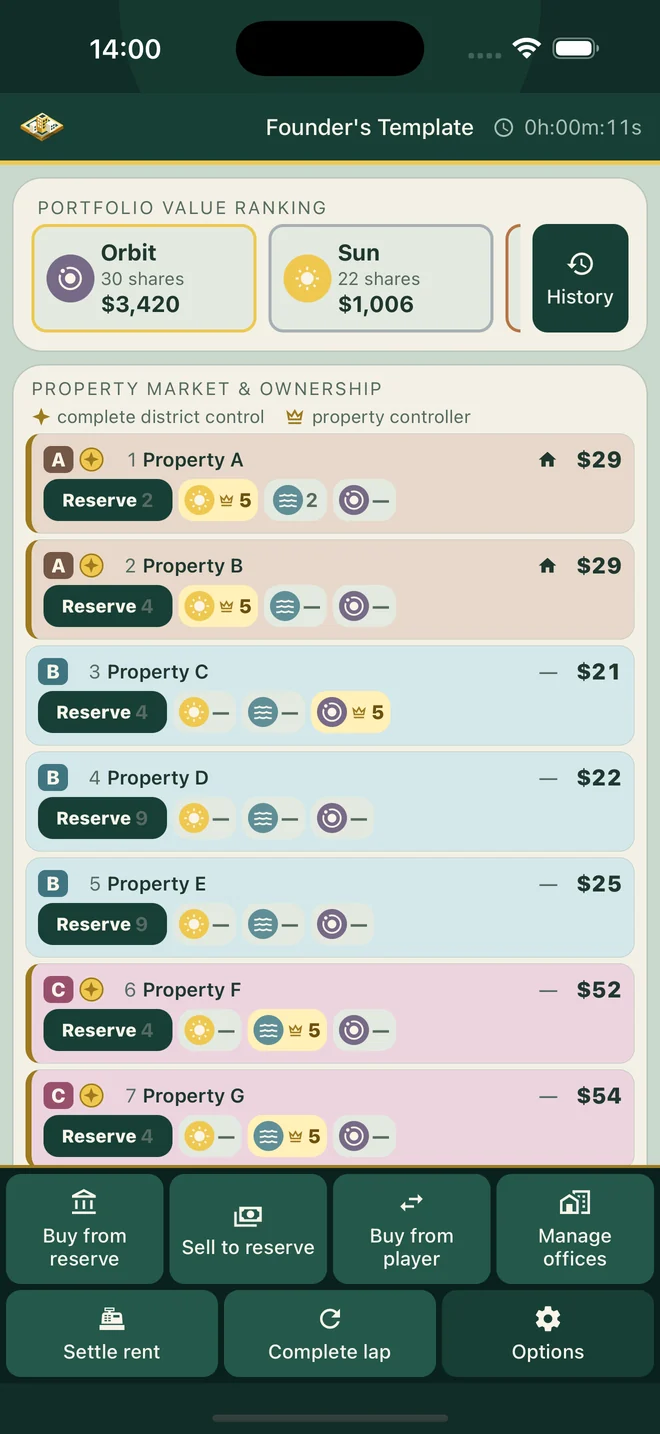
A property can have several shareholders. Follow all 22 properties, changing prices, and every player’s holdings in one shared market. See where your next stake could take you.
 Equity EmpiresAvailability
 The property-game companion
Turn your physical property game into a market everyone can own. Trade shares, collect dividends, and give the whole table a new way to win.
See how it plays↓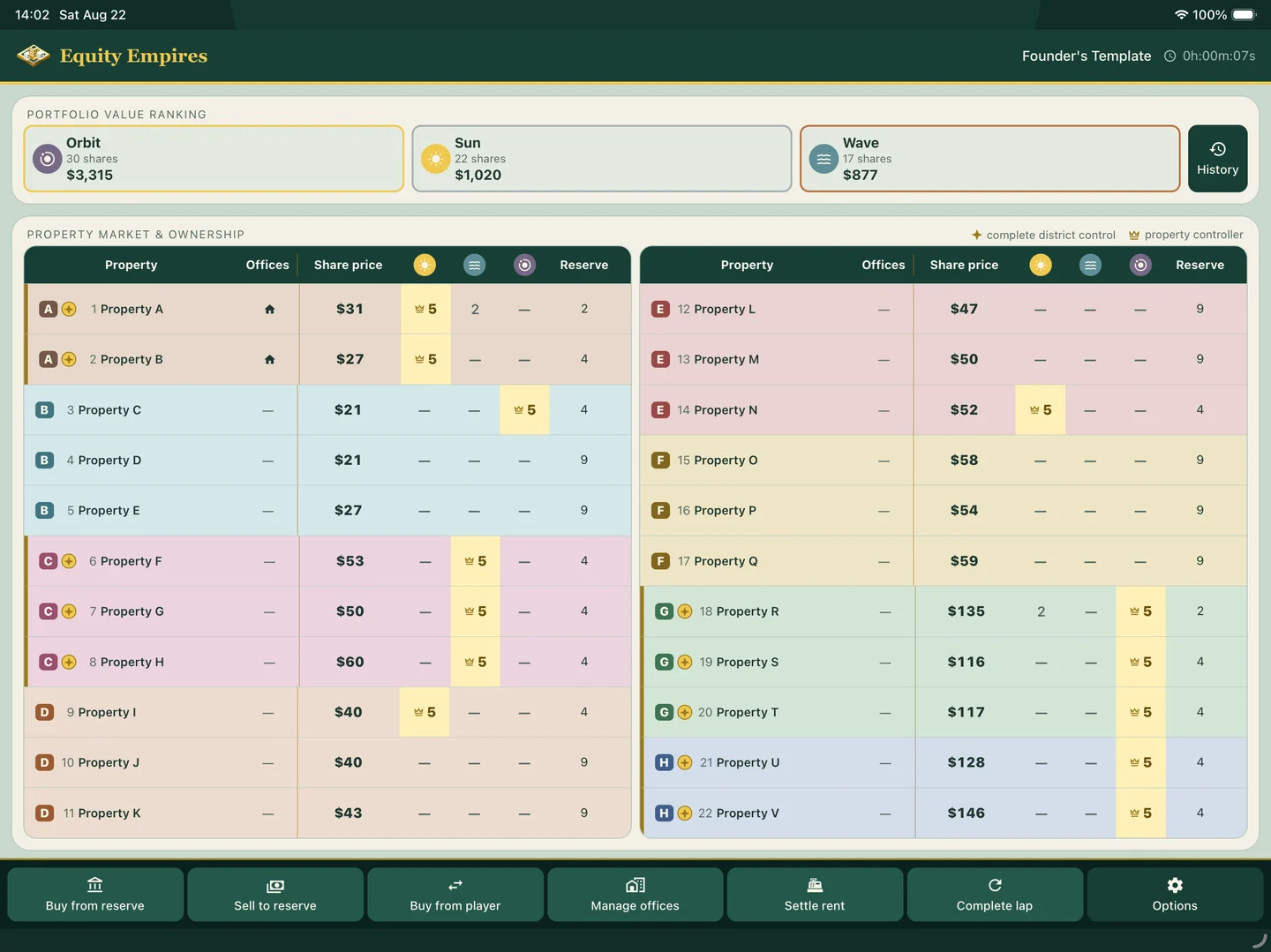
More strategy at the table
When everyone is second-guessing who owns what, the game loses its rhythm. Equity Empires keeps shares, rent, and portfolio values in view—so you can get back to the good part: outplaying each other.
01 / See the opportunity
A property can have several shareholders. Follow all 22 properties, changing prices, and every player’s holdings in one shared market. See where your next stake could take you.
02 / Make your move
Buy from the reserve or another player. See the cost, your new holdings, and the price effects before you confirm. The app handles the calculation. The strategy is yours.
03 / Keep the table together
Review confirmed actions in a shared history. If a tap goes wrong, undo the latest app action and keep playing. Just reverse any physical cash exchanged at the table, too.
The whole market. One clear view.
A property can have several shareholders. Follow all 22 properties, changing prices, and every player’s holdings in one shared market. See where your next stake could take you.
Keep the ritual. Change the strategy.
Your board, your people, your next great game night.
Equity Empires takes care of the market.
Gather 2–6 players and your physical property game. Choose your markers and name the 22 properties to match your board.
Keep the dice, movement, cards, and money on the table. Let one player enter trades, rent, and lap payouts on the shared device.
Trade for a bigger stake, collect dividends, and develop offices when you control a district. Follow the portfolios as the session unfolds.
One companion for everyone. Practice before you play, pause when you need to, and pick up your saved session on the same device.
Bring a new market to game night
Keep the game you gather around. Add shares, dividends, and a whole new reason to watch everyone’s next move.
The support desk
From your first session to a move you want to undo, start here. Still stuck? Tell us what happened and which device you’re using.
Send us your question, device, and app version. We’ll help you get back to the table.
Email supporthello@knowncs.comEquity Empires is a companion for a physical, route-based property game. Bring your board, dice, pieces, cards, and play money. The app adds a shared market of 22 properties, with tradable shares, changing prices, rent, and dividends. It does not move pieces, roll dice, draw cards, or track physical cash.
Equity Empires is coming soon to the App Store and Google Play. The Apple version is designed for iPhone in portrait and iPad in landscape; Android is in development. Download links will be available here when the app launches.
A normal session has 2–6 players sharing one device. Choose a player to be the market steward and enter the table’s financial events. Everyone can follow the same market; separate phones or accounts are not needed.
Yes. The guided tutorial walks through setup, shares, rent, lap payouts, and options with sample session data. It does not change your saved sessions. You can leave the tutorial at any time and replay it from How it works.
Use Buy from reserve, Sell to reserve, or Buy from player. A property’s first purchase grants five shares at its first-purchase cost; later trades use the current share price. Each trade previews its cost or proceeds, resulting holdings, and price effects before you confirm it.
Settle rent calculates the payment after considering the active player’s own shares, then distributes rent among shareholders as dividends. Complete a lap pays that player’s accumulated dividends plus the configured lap bonus, clears their dividend balance, and applies the market’s lap price adjustment. Exchange any physical money at the table separately.
One player must control every property in a district before offices can be built, and development must stay even across that district. If district control is broken later, its existing offices are automatically liquidated and the app shows the reserve refund due.
Open History beside the portfolio ranking to review confirmed actions. Undo restores the app state from before the most recent action when an undo is available. It cannot reverse money already exchanged at the table, so make that correction separately. You can also cancel a transaction preview before confirming it.
Yes. Name the 22 properties to match your physical board and save a reusable property template. House Rules can change price swings, action-based price changes, share supply, ownership discounts, and office refunds. Changes to House Rules apply to the next session; an active session keeps the rules it started with.
Open Options, choose Save session, select one of six local slots, give it a name, and save. To return, choose a saved session and tap Resume session. Save your current progress before opening another session. Replacing an occupied slot overwrites its previous save.
No. Saved sessions and customizations stay on the device where they were created; there is no cloud sync or account-based recovery. Do not rely on reinstalling the app or changing devices to restore them. Keep the app and its local data intact if you want to return to a saved session.
No account is required, there are no ads, and gameplay works offline. Usage analytics and crash diagnostics can use an internet connection separately from gameplay. Playing offline does not change your analytics preference.
Saved sessions, player names, property text, marker images, balances, and individual transaction details stay on your device. On iOS, usage analytics is on by default: Mixpanel receives usage, screen and tap events, an installation identifier, device information, and approximate location. Turn off Anonymous analytics in Options to stop future collection and clear queued analytics. If the app reports an error or unconfirmed status, use Retry to confirm the change. This does not recall already-sent events or disable separate Sentry crash and error diagnostics.
Those permissions are optional and let you make a custom player marker from a photo. Image processing, including background removal and styling, happens on your device. You can use the built-in markers without granting camera or photo-library access.
Email hello@knowncs.com with your device model, operating-system version, app version, what you were doing, and the exact error shown. If you include a screenshot, hide any player names or other details you do not want to share. For a save or storage problem, keep the app installed and preserve its local data while you contact us.